
Establishing Your Organizations, Sites, and Sets

John Q. Todd
Sr. Business Consultant/Product Researcher
Establishing your Organizations, Sites, and Sets within a Maximo (or MAS Manage) instance can be a one-time and initial thing that is done and never looked at again. However, the implications of these early decisions and the resulting structure are often forgotten. The “what” you did is obvious. It’s the “why” that might need recollection.
Maximo supports configurations with multiple Organizations utilizing the same Maximo instance/database. Common configurations are a single Organization with multiple Sites or multiple Organizations with multiple Sites. Your Maximo configuration should be based on the needs of the business units that are leveraging Maximo to support their business processes.
Organizations
An Organization is a legal or logical business entity. You can see from the screenshot below that there are two main elements as to how an Organization is configured:
- Record settings such as the Base Currency, Item/Company Sets, Default Statuses, a Top-level Clearing Account, and of course a Status
- On the Actions menu, there are many options that can be set to suit business needs, per Organization. (These options have a dramatic impact on how certain functions operate within Maximo, under each Organization. They are often forgotten as the reason why a function is behaving a certain way.)
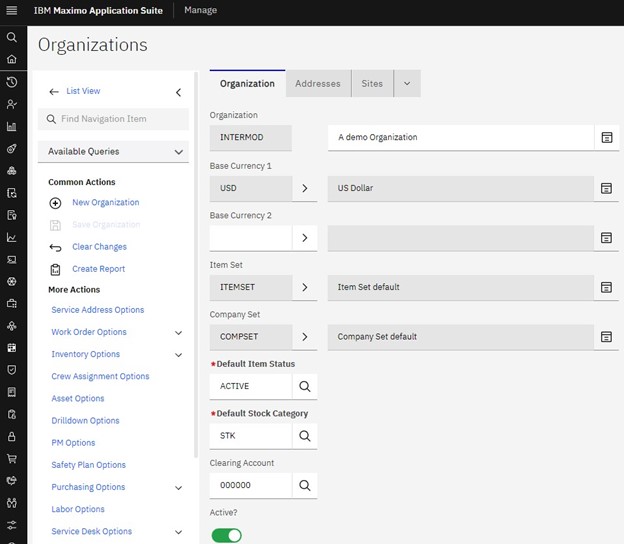
Only a single language is supported for each Organization in Maximo. Multi-language support is implemented through multiple Organizations.
The decision to implement one or more Organizations in your Maximo instance is largely based on your need for more than one language or currency. If your business operations in Maximo are to be conducted in a single currency or language, then you only need one Organization configured.
However, if your business consists of multiple business entities that need to remain separate, but will be using a single Maximo instance, then multiple Organizations may need to be configured.
Each Site configured under the Organization inherits information and settings from the Organization level. Examples are:
- Chart of Accounts
- Base Currency
- Companies
- Items
- Labor
- Purchase Contracts
The following Maximo Applications are managed at the Organization level. This means that as records are created in these applications, for example, Calendars, it is required to associate the record with a specific Organization. Only that Organization will be able to access that record (Calendar in our example.)
- Calendars
- Chart of Accounts
- Companies
- Currency
- Exchange Rates
- Failure Codes
- Labor
- Labor Reporting
- Meter Groups
- Meters
- Reports
- Stocked Tools
- Tools
However, some specific records can be shared across Organizations. When these records are created, the Organization(s) that can gain access are set.
- Items
- Companies
- Job Plans
- Master PMs
Once an Organization is created in Maximo it remains in Active or Inactive status. Because an Organization record is a foundational record in Maximo, permanently removing it from the database cannot be performed from the User interface.
Sites
Sites identify physical work locations within an Organization. However, to be clear, they are not Locations in the sense of the Location hierarchy that is also built into Maximo. You may consider them the “wrapper” around a set of Locations, but not a Location in the hierarchy itself.
As you can see in the screenshot below, Sites are rather a simple definition. Yet, Sites are used to control a significant amount of what Users can do within Maximo, depending upon the Site(s) they are associated with.
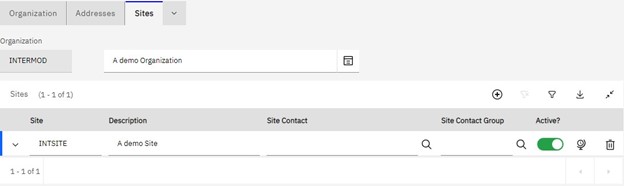
Given that there can be multiple Sites under a particular Organization, a Site can represent many different, “places.” Some examples could be:
- A college campus
- A hotel property
- A processing plant
- An oil field
- A fleet management area
- A city
A Site can only belong to one Organization.
Assets, deployed assets, locations, work orders, inventory, and purchasing are all managed at a Site level. Assets and Locations must be unique within a Site. However, Assets can be transferred across sites within the same Organization. Maximo users can be granted access to one or more Sites in an Organization.
The following Maximo applications are managed at the Site level:
- Assets
- Assignment Manager
- Condition monitoring
- Deployed Assets
- Desktop Requisitions
- Inventory
- Invoices
- Issues and Transfers
- Job Plans
- Locations
- Preventive Maintenance
- Purchase Orders
- Receiving
- Reconciliation
- Request for Quotation
- Routes
- Service Items
- Storerooms
- Work Orders
Once a Site is created in Maximo it remains in Active or Inactive status. Because a Site record is a foundational record in Maximo, permanently removing it from the database cannot be performed from the User interface.
An important point to bring out about Sites is their role in Security Groups and how they interact with Labor records. Recall that under any Security Group, a User may be a member of is the Sites tab. It is on this tab where you either allow the User to interact with all Sites or a select list of Sites. This configuration, along with the User’s Default Insert Site has a significant impact on what an individual User can see and do.
Further, since Labor records are based upon a Person’s record, and both have references to Sites, you need to consider those configurations as well. Just like Sites, Security Groups have a Labor tab where you configure the extent a User can see and manage their Labor records and those of others.
Sets
Maximo utilizes the concept of Sets to allow the sharing of data across Organizations. There are two types of Sets: Item Sets for assets/inventory and Company Sets for vendors, clients, etc. Maximo can have multiple Item Sets and multiple Company Sets. These Sets can be shared across multiple Organizations or can be utilized by only a single Organization.
In fact, you establish your Item and Company sets prior to defining an Organization. An Organization record cannot be saved without an Item and Company set referenced.
As you can see from the screenshot below, different Organizations can use different, or the same Item or Company sets.
What to do now?
As we said at the beginning, these settings and decisions were most likely made long ago when your Maximo was first implemented. You might need to do a little research as to why things are set the way they are.
Further, remember the long list of options that can be set at the Organization level. If you are struggling why a feature/function is behaving in a certain manner, or in a way not suitable to your business, check to see how that is set under the various Options Actions for the Organization. Don’t forget the Site and Labor settings that are made at the Security Group level, or which a User could be a member of more than one.
Of course, TRM does this kind of configuration for clients daily, so we are available to help. Whether you are starting from scratch or trying to sort out the good ideas of the past, please make contact before you get frustrated.
John Q. Todd, Sr. Business Consultant / Product Researcher at TRM. Reach out to us at AskTRM@trmnet.com if you have any questions or would like to discuss deploying MAS 8 or Maximo AAM for condition-based maintenance/monitoring.
Ready to elevate your asset management?
Connect with TRM to start your journey toward exceptional performance.
Related Resources
Explore insights, guides, and tools designed to help you unlock greater asset management performance and business value.


Unlock smarter
asset management
Ready to elevate your asset management?
Connect with TRM to start your journey toward
exceptional performance.