When Out of the Box Doesn’t Cut It – Configure vs Customize

John Q. Todd
Sr. Business Consultant/Product Researcher Total Resource Management (TRM), Inc.
December 10, 2025
Every day we are faced with choices. Some are easy and quick, while others require careful research and a multitude of counselors. No matter the size of the decision, they will all have consequences. That is why it is important to think about mitigation – taking steps to ensure as much as possible that today’s choices have the intended outcomes in the future and do not stand in the way of the next set of decisions to make.
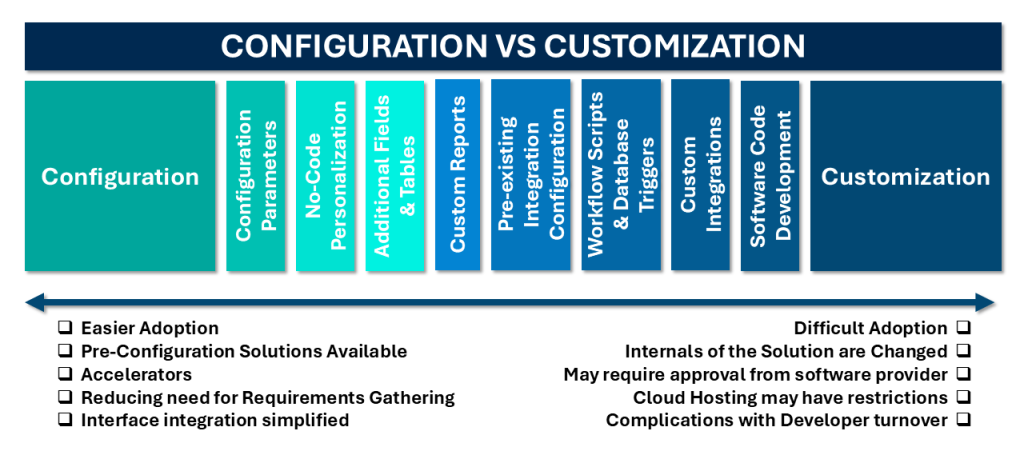
There is an ongoing debate on how to answer the question as to when/how to utilize a software solution such as an EAM like IBM Maximo, SAP, HxGN EAM, etc. fully out of the box, or to customize it to suit specific business processes, This article will explore the range between these bookends, in particular the realm of “configuration” that will likely solve most any business process concern.
“Just use it out of the box!”
Consider when you purchase a new pickup truck. Research is conducted to ensure the vehicle contains the basic features/functions you believe are needed in the short and long term. Out of the box it is pristine – shiny and bright! You might need to adjust how you do a few things to suit the use of the new vehicle, but overall, it delivers what was expected.
There was a time in the past where implementing an enterprise-level software solution required specific “changes” before it was of any use. Many, many hours of requirements gathering were performed to describe what the business needed the solution to deliver. With more modern solutions, all those years of basic business processes, such as work, purchasing, and inventory management, have been merged into the solution in generic ways.
 While the out of the box (OOB) process that comes in the solution might not fit your business process exactly, it could be close enough and perhaps a fresh start. Taking a hard look at how the OOB processes work in the solution and if the organization could adopt them directly has significant value.
Does it fit in the garage? Oops.
There will always be something that the OOB software does not do, or a feature that was not considered. That is what the next “level” is all about.
Pre-configured or “accelerator” solutions
Given the many, many years and thousands of EAM implementations that solution providers have performed, it stands to reason that there are many configurations that are done repeatedly. Further, specific industries have nuanced configurations that are also applied nearly across all implementations in these arenas.
As such, software providers offer “pre-configured” solutions or even “accelerators” that are designed to speed up implementation and user adoption, significantly reducing the need for upfront requirements gathering and other design efforts. While the initial pitch from the provider is that an organization could adopt the pre-configurations as is… much like out of the box… there is always room for additional specific configurations or adjustments to ensure the solution meets the requirements.
In general, and there are exceptions, a pre-configured solution follows the built-in (or related) tools to make the configurations prior to client engagement. This is the best situation as it allows any of the pre-configs to be adjusted during and well after the implementation by the client. There is nothing hidden about the pre-configs, so the client is protected and future proofed.
It’s important to know what constitutes the “base” and what is pre-configured when evaluating these types of solutions. Eventually the solution will be upgraded, and the impact of any pre-configs… just as any subsequent configurations… will need to be clearly understood.
Configuration – The workhorse of any implementation
Early in the life of the shiny new pickup, there is a need to go camping. That requires a camper shell, then a bigger camper shell, then a full-on slide-in. Soon after these different configurations are explored, a hitch is needed to tow a new toy-hauler trailer.
Software solutions are no different. As part of the procurement process, the question as to how the solution can be “configured” to suit the needs of the organization over time must be asked and the answer clearly understood. Most solutions have a variety of mechanisms baked in that enable administrators, developers, and even certain users to make “changes” to the system. The initial implementation of the solution will always require several configurations to establish the foundation for its use. Organizational boundaries, initial data record loads, user entitlements, interfaces to external systems, etc. are all examples of configurations. There is nothing “custom” about these actions. Rather, they are simply additions, settings, rules, and adjustments that are taken to get the solution up and running.
When the time comes to place the very heavy slide-in camper in the bed of the truck, most likely the rear shock/suspension might need to be beefed up. Just another example of a configuration.
No matter the degree of configuration that needs to be performed over time, there are two critical elements to expend some effort on:
- Documentation
- Testing results
- Organizational long-term memory
The first two are easy: When teams make configuration changes, no matter how small, and process them through a change management methodology. This methodology ensures the capture of the source/reason for the change, as well as the change itself, and the testing results. Further, the acceptance of the impacted user community is clearly noted. This documentation package will pay dividends when it comes to troubleshooting, upgrade regression testing, and designing the next iteration of business processes.
Speaking of which, businesses are always in a state of flux. Any supporting work processes should be morphed right along with the direction of the business. How work was managed 10 years ago might need to be vastly different now with the adoption of new technologies or even because of mergers and acquisitions. If the current software solution is to remain the foundational tool for the business as it changes, knowing how the system is configured and why (the reasoning of the past) is important. A robust documentation approach will support both short and long-term activities.
Configuration and re-configuration, using the tools provided within (or related to) the software solution should be looked upon as a typical set of tasks to perform. These tasks capture the needs of the users or the business and translate them into changes to the system, using the tools provided, and of course, document the process end-to-end.
One area of configuration to consider is when the core system needs to communicate with external systems. A typical example is the EAM system passing data back and forth to an accounting or purchasing system. Most modern EAM systems provide a set of interface technologies that make the configuration of such interactions far simpler than in the past. The development of an interface is not a customization… it is a typical configuration.
Be careful though… adding a slide-in camper will most likely prevent the rig from fitting in the garage. Measure twice and all that!
Customization – “Beyond, thar be monsters”
There are instances, hopefully rare, where the OOB functions do not suit the requirement, and the requirements need to go beyond what the provided configuration tools can deliver. Customization is where the internals of the solution are changed… some would call it “hacked” … to deliver the needed function. This development effort may require assistance (and perhaps approval) from the software provider. In some cases, the local administrators can perform this to their own peril. If the solution is hosted in the cloud, the host may have significant restrictions as to what can be hacked… as well they should.
Maybe the camping phase of life is over, and it is time for a hot rod. Let’s chop the top, lower the suspension, drop a chromed out blueprinted motor in it, and spend way too much money on a custom gold flaked paint job. Is it still a pickup? Sure, but we have forever changed its form/fit/function, so we’d better make sure that is what we want.
Customizing a software solution can take the same approach as performing configurations, but attention to documentation detail and testing is greatly increased. Quite often any customizations can be wiped out or even stand in the way of an upgrade. Receiving support from the vendor or from the original source of the solution can become problematic if the changes to the base product are not well understood by all.
Developer/vendor turnover is often the Achilles heel for customizations. Unless the material changes made to the software solution are well documented, functions that the business is dependent on may cease to be delivered after an upgrade. Even worse is the situation where a function is unknown to everyone involved, and it is “worked around,” because its source cannot be found. Avoid heavy customizations – or any at all – since they can turn developer turnover into a major challenge. Does the business really need this function implemented in this way?
Making it happen
The first step is to make a comprehensive comparison between the out-of-box capabilities (and/or pre-configured/accelerator) of the current software or the software solution being considered. Major business processes are important as well. You may discover opportunities for business to take advantage of how the solution operates vs. trying to force the business process into the solution. This is a delicate balance but is always worthwhile. Evaluate how much configuration is needed to make the solution fully support the business.
TRM has been assisting clients across industries to implement technological solutions to enhance the performance and reliability of not only business processes but equipment itself. TRM continues to be at the forefront of the technological solutions that are available, yet we also have practical experience and understanding to know where they do and do not fit. Let us help you build a reasonable roadmap that is not only achievable but also will have the desired impact on the organization.
For readers looking to dive deeper, our white paper, “Your Journey to Digital and Operational Excellence for Asset Management,” offers practical guidance on the various phases of implementation and assessments.
Contact one of our Senior Business Consultants at askTRM@trmnet.com
Ready to elevate your asset management?
Connect with TRM to start your journey toward exceptional performance.
Related Resources
Explore insights, guides, and tools designed to help you unlock greater asset management performance and business value.

Unlock smarter
asset management
Ready to elevate your asset management?
Connect with TRM to start your journey toward
exceptional performance.