
MAS Manage Implementation: Foundational Data Makes It Work

John Q. Todd
Sr. Business Consultant/Product Researcher TRM
February 12, 2026
A Practical Guide to Building a Strong Enterprise Asset Management (EAM) Foundation
We are often asked, “What data records must be in place in order for the applications in the Maximo Application Suite (MAS) Manage to be useful for users?”
To answer this question, as any good consultant will tell you, “It depends.”
Initially, here is a good list to begin with that will provide a solid foundation for the MAS Manage implementation. This will help get MAS users headed in the right direction. Yes, every implementation is different, but these are the minimums.
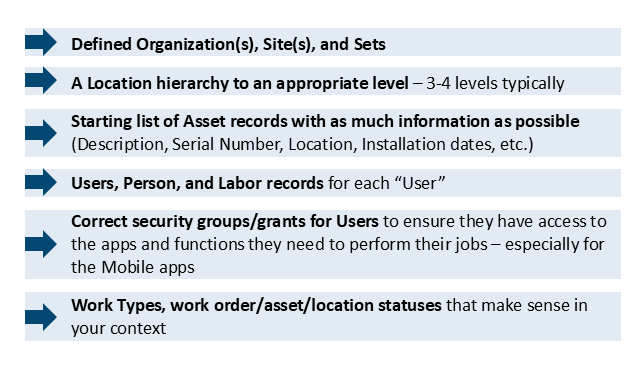
That’s it to get started. You can begin processing simple work orders now. Only these few foundational data in records are needed. (But perhaps this limited set is only good for initial exploration with the new system. This might not suffice for “production.”)
Which records to look into next?
Once the foundational records are in place, which records should you look into next? Here are several high-priority records we strongly recommend getting into the system early. Each item below includes a brief explanation outlining its importance.
- Systems – For Locations, organizing them into logical groups, beyond just “Primary.”
- Financial periods and GL Accounts – setting the system up for being able to track debit/credit charges across Manage
- Calendars and Shifts – used to associate schedules with Labor, Crews, Assets, Tools, etc. especially important if you plan to use the Graphical Scheduling applications
- Crews, Crafts for Labor – Particularly important if you intend to use the Graphical Scheduling applications or if you prefer assigning work to groups rather than individuals
- Item records – If you plan to track spare parts and other materials used on Work Orders, the Item Master needs to be populated, and initial inventory levels may need to be imported
- Preventive Maintenance records – Establish early in the implementation the triggers that generate Work Orders based upon time, usage, or condition-based criteria.
- Map Manager – Use OpenMap (free) to give Users spatial information about their work
- Operational Dashboard views (or Start Centers) to give staff easily accessed lists of their work and KPIs… which you will develop later
- Workflows and Work Queues – two very different types of records, but they support automation efforts, making the processing of records such as work orders far more efficient.
- Qualifications – Ensure that Labor is only assigned work and tools for which they are properly qualified.
Once in production for a time…
After you have been working with the system for a short while, begin to form these records to pull even more value out of the implementation:
- Job Plans
- Routes
- Meters – Mostly for Assets, but can be on Locations as well
- Inspection forms
- Asset Templates
- Condition Monitoring Points
- Item/Asset/Location images on records
- Failure Classes (Problems, Causes, Remedies)
- Hazards, Precautions, Safety Plans
- Classifications/attributes for Items, Assets, etc. for grouping, searching/filtering, and data consistency
- Service Addresses with GPS coordinates – if the Locations/Assets are geographically separated
- Tools and Stocked Tools – if you have tools that cost you by the hour or you need to keep close track of
- Reliability Strategies – To establish and refine the approach to maintaining the asset sets
- Use of the Graphical Scheduling applications to form Work Order-focused schedule records
- Service Request classifications/sub-classifications and images to make the submission of a Service Request far easier for your Users
- Look into the use of the MAS Health component as it rides on top of Manage and can give you an excellent view into the health of your Assets and Locations. It uses meter and field values, and formulas to “score” what might be contributing to low health of your Assets.

A phased approach…
Within MAS Manage itself, there are nearly 200 unique applications that can support your User communities. However, only a few require initial record sets to be functional. More importantly, the vast majority will contain records that Users create, and there are natural relationships across these applications, greatly reducing “double-entry” and also significantly reducing entry errors.
Wrap up…
In the end, there will be many different records in ASM Manage and the other MAS components as the years go by. But, it only takes a few key records in the system to get up and running. Focus on these foundational records so the system starts off on the right foot and supports your Users immediately.
Ultimately, successful MAS Manage implementations don’t happen by accident. They start with the right data, the right structure, and the right guidance.
For decades, Total Resource Management (TRM) has helped clients across industries implement technology solutions that improve not only business processes, but the performance and reliability of the equipment itself. While TRM remains at the forefront of emerging technologies, we also bring the practical experience needed to understand where these solutions do—and do not—deliver value.
Ready to take the next step? Contact Total Resource Management at askTRM@trmgroup.com to discuss how we can build a practical, phased roadmap to Maintenance X.0—focused on long-term sustainability and measurable maintenance excellence.
For additional insights on reliability, availability, and practical asset management, follow John Q. Todd on LinkedIn.
Ready to elevate your asset management?
Connect with TRM to start your journey toward exceptional performance.
Related Resources
Explore insights, guides, and tools designed to help you unlock greater asset management performance and business value.


Unlock smarter
asset management
Ready to elevate your asset management?
Connect with TRM to start your journey toward
exceptional performance.