Maximo Application Suite (MAS) and RHOS Terms and Concepts

John Q. Todd
Sr. Business Consultant/Product Researcher
May 9, 2023
Let’s get right to it… Maximo Application Suite (MAS) and the underlying Red Hat OpenShift environment needed to deliver it to users comes with many new terms and concepts to learn. Lots is being written and continues to be updated, but here is a quick guide to clear out some of the smoke and point you in the right direction.
AppPoints
The idea behind AppPoints vs. the traditional method used to license Maximo, is that the client is entitled to a pool of AppPoints that Users draw from as they login and use the various components of Maximo Application Suite (MAS). Depending upon what the User gains access will depend upon how many AppPoints are drawn from the pool. When the User logs out, those points are returned to the pool.
Administrative Users will have a certain number of AppPoints “reserved” for them, and some Users can have both Administrative and Application entitlements. Further, Users can be set at different levels: Limited, Base, and Premium, defining their access to specific components of MAS. For example, a Premium User would have access to “everything,” while a Limited User would only have access to Manage and Mobile applications.
AppPoints management is performed at the MAS level by MASADMIN. There, the entitlements to the pool of AppPoints are managed as well as the high-level access the Users have to MAS. User access to Manage applications and functions are still performed within Manage via Security Groups and User records. Manage and MAS sync User information with each other, and any inconsistencies are made known to MASADMIN.

MASADMIN
MASADMIN is just that… the Administrative User for the MAS environment. MAXADMIN remains the Administrative User for the Manage (formerly known as Maximo) component of MAS, but has no MAS-level authority.
Typical tasks MASADMIN would perform are:
- Add new MAS Users and set their entitlements, passwords, etc.
- Adjust MAS configurations such as LDAP and SAML
- Deploy and activate MAS add-ons, components, and Industry Solutions
- Manage AppPoints
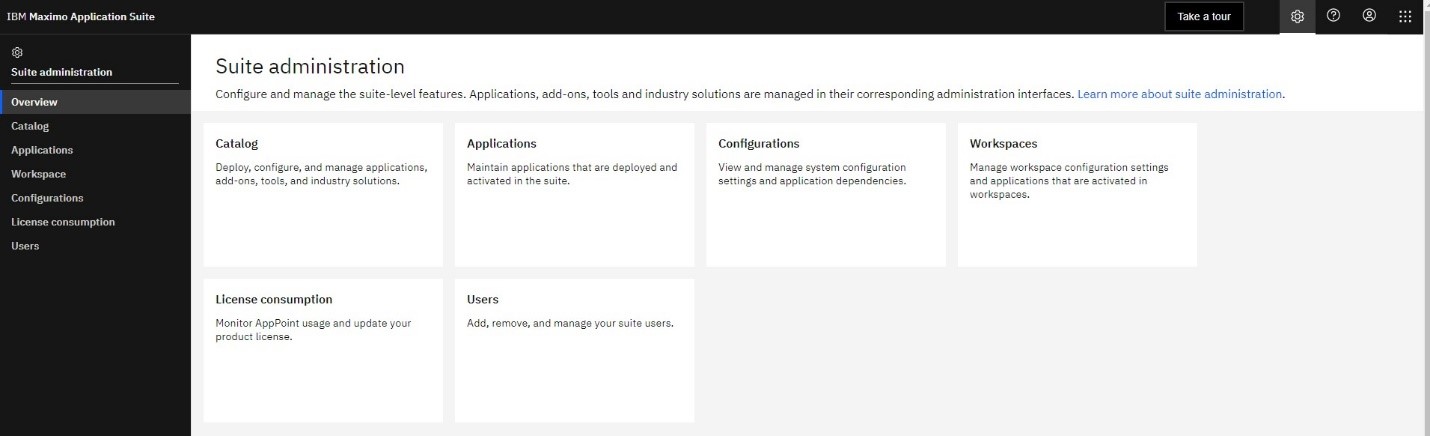
If your MAS environment is being hosted in the cloud, depending upon the hosting agreement, you as a client might not have access to the MASADMIN User. Be sure to understand the terms of your hosting so you know what you can do and what you need to submit requests for.
Red Hat OpenShift (RHOS)
With the purchase of Red Hat by IBM, and the focus on cloud-based solutions, it should be no surprise that Maximo has moved into this type of environment. RHOS is designed for developing, deploying, and operating applications in the cloud. However, keep in mind that you can establish RHOS environments on your own whether in the cloud or with your on-premises data center.
RHOS is built upon Kubernetes, a containerized application technology that has been around for many years.
From a User perspective, there is no difference between their “Maximo,” applications running on the legacy infrastructure or from within RHOS. Users still access their applications via a browser/URL or mobile applications.
What does change is the RHOS skills needed to operate the environments. Also, some of the typical administrative tasks (such as redeploying EAR files, accessing logs files, managing WebSphere, etc.) are either eliminated or are performed via different paths than in the past.
Cluster
A cluster in the context of RHOS/Kubernetes, is a collection of nodes (servers) that provide the containerized applications to Users (or other systems). While the nodes themselves may be running the applications and services, Users are connecting to the cluster, not any particular node. This makes the system highly available to Users as they are not dependent upon a particular server.
Operationally, clusters are managed to surge or scale as compute resources are needed to accommodate workloads. RHOS Administrators configure and manage this automation.
Containerized Applications
Think of a containerized application as just that… an application and all its binaries, dependencies, libraries, etc. in a package that can be run anywhere. The Maximo of the past has been placed into a RHOS Application Container, which runs within a RHOS cluster. The underlying infrastructure and host operating system does not need to know anything about the application.
When establishing a containerized application environment, it all begins with an image. An image file (typically an archive/compressed file) is introduced into the RHOS environment and then deployed. Once deployed, the image is now a container that can be exposed to Users.
Pods
Pods “wrap around,” the application container(s)… yes one or more, enabling them to be managed and available to Users. They are a key point of RHOS management. If a pod is not running, the application will not be available to Users. Pod configurations, via YAML files, are a common task. Pod and application log files are also available to the operator.
MAS Components
MAS is a collection of applications and add-ons that go far beyond just the Maximo set of apps from the past. There are the familiar:
- Manage – nearly the same set of apps, features, and functions of legacy Maximo
- Add-ons such as Health, Safety, Environmental, Spatial, etc. Some are new, while others are familiar
- Industry Solutions such as Utilities, Transportation, Oil and Gas, etc. that are familiar and focused on extending Manage functionality.
- MAS Applications such as Monitor, Health, Visual Inspection can also be deployed and activated as desired. There is nothing else to download as they are simply part of the MAS installation process.
- MAS Mobile is a collection of applications designed to operate on mobile devices for off-line situations and within browsers if desired. Each release of MAS beings more Mobile applications.
- MAS API is fully documented across the MAS components, opening up the potential of unique application development by clients and IBM business partners.
TRM MAS-related Offerings – trmgroup.com
Given TRM’s long experience with implementing Maximo across industries, it stands to reason that we would have lots to offer a current or new client as we all turn our attention to MAS. In particular, we have a set of offerings that can assist clients in all situations to move towards MAS:
- MAS trial instance – a temporary cloud instance so you can investigate MAS.
- MAS trial upgrade – let us help you perform an initial run at migrating your current Maximo environment into a cloud instance, documenting the issues along they way, forming a solid plan for the actual migration.
- Digital Transformation – a holistic evaluation and strategy of your People, Processes, and Programs to ensure your organization continues along the path of improvement, leveraging the quickening pace of technological change.
- OMNI – A.I. Based Maximo Assistant – Bring together all of your business and training documentation for easy access and provide an efficient and natural-language “helper” to your staff.
Wrap up
In the end, making the move from legacy Maximo to MAS involves both the very familiar and the rather new. While the basic feature/functionality of Manage (the “Maximo,” part of MAS) is not very different than the Maximo you know so well, the delivery mechanism is. RHOS as the underlying operating system, while not really that new, is rather different than the traditional server approach.
Whether your goal is to move from on-prem to the cloud, or stay on-prem, TRM has the skills and experience to help you make the migration to MAS.
Ready to elevate your asset management?
Connect with TRM to start your journey toward exceptional performance.
Related Resources
Explore insights, guides, and tools designed to help you unlock greater asset management performance and business value.

Unlock smarter
asset management
Ready to elevate your asset management?
Connect with TRM to start your journey toward
exceptional performance.